


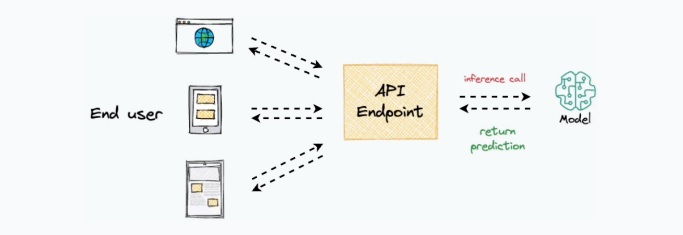
The core objective of model deployment is to obtain an API endpoint that can be used for inference purposes
While this sounds simple, deployment is typically quite a tedious and time-consuming process. One must maintain environment files, configure various settings, ensure all dependencies are correctly installed, and many more. So, in this chapter, I want to help you simplify this process. More specifically, we shall learn how to deploy any ML model right from a Jupyter Notebook in just three simple steps using the Modelbit API. Modelbit lets us seamlessly deploy ML models directly from our Python notebooks (or git) to Snowflake, Redshi, and REST.
https://www.dailydoseofds.com/
InoVision

# Install the Modelbit package
!pip install modelbit

import modelbit
import numpy as np
from sklearn.linear_model import LinearRegression
import requests

# Login to Modelbit
mb = modelbit.login()

# Training a simple Linear Regression model
X_train = np.array([[1], [2], [3], [4], [5]])
y_train = np.array([2, 4, 6, 8, 10])

model = LinearRegression()
model.fit(X_train, y_train)

# Define the inference function
def my_inference(input_data):
    if not isinstance(input_data, (list, np.ndarray)):
        return {"error": "Invalid input format. Expected a list or numpy array."}

    input_array = np.array(input_data).reshape(-1, 1)
    prediction = model.predict(input_array)

    return prediction.tolist()

# Deploy the model to Modelbit
mb.deploy(my_inference)

# Using the deployed API endpoint for predictions
api_url = "https://your-modelbit-api-endpoint"
data = [[1], [2], [3], [4], [5]]
response = requests.post(api_url, json={"inputs": data})
print(response.json())

# Specify Python version and dependencies for deployment
mb.deploy(my_inference, python_version="3.9", requirements=["scikit-learn==1.0.2", "numpy"])

# Shadow Testing - Running old and new models side by side
def shadow_testing(input_data):
    old_model_output = legacy_model.predict(input_data)  # Legacy model output
    new_model_output = my_inference(input_data)  # New model output

    # Log results for comparison
    log_results(old_model_output, new_model_output)

    return {"legacy_model": old_model_output, "new_model": new_model_output}